App not installed
Possible causes: Incomplete APK download, old version already installed, or insufficient storage Download the package again and reinstall

Website:https://smallkite.com/
Android: https://smallkite.com/download/kite.apk (official) / https://play.google.com/store/apps/details?id=com.smallkite.android (Google Play)
Windows: https://smallkite.com/download/kite.exe
Mac: https://apps.apple.com/hk/app/id6762107670?platform=mac
iPhone+iPad: https://apps.apple.com/hk/app/id6762107670
Kite currently provides Android, Windows, macOS, iPhone and iPad versions.
Due to App Store availability policies in mainland China, some network tools may not be available in the China App Store. If your Apple ID region is mainland China
You may see: 1. the app cannot be found 2. the link is unavailable 3. download is unavailable in the current region
In this case, switch to an Apple ID from another region.
If your account has no: 1. active subscriptions 2. balance 3. Family Sharing
You can change the region directly.
Steps:
Open App Store → tap avatar → Apple Account → Country/Region → Change Country or Region
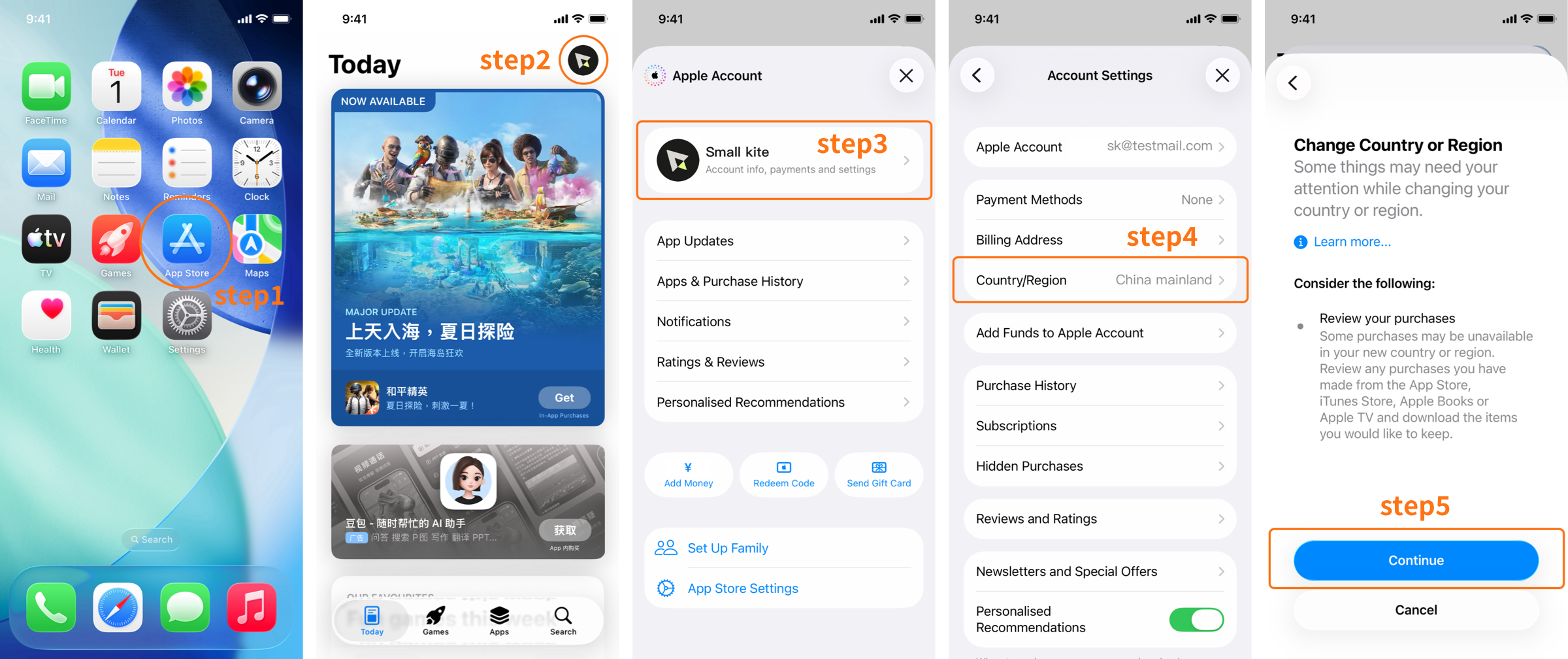
Recommended regions:
Hong Kong, Taiwan, United States, Japan, Singapore
After changing the region, reopen the download link.
This is the most common approach.
Note: If you use a third-party account, do not sign in to iCloud. Sign in only to the App Store. Important: do not sign in to iCloud.
Step 1: Sign out of the current App Store account
Settings → Apple Account → Media & Purchases → Sign Out (this does not affect iCloud data)
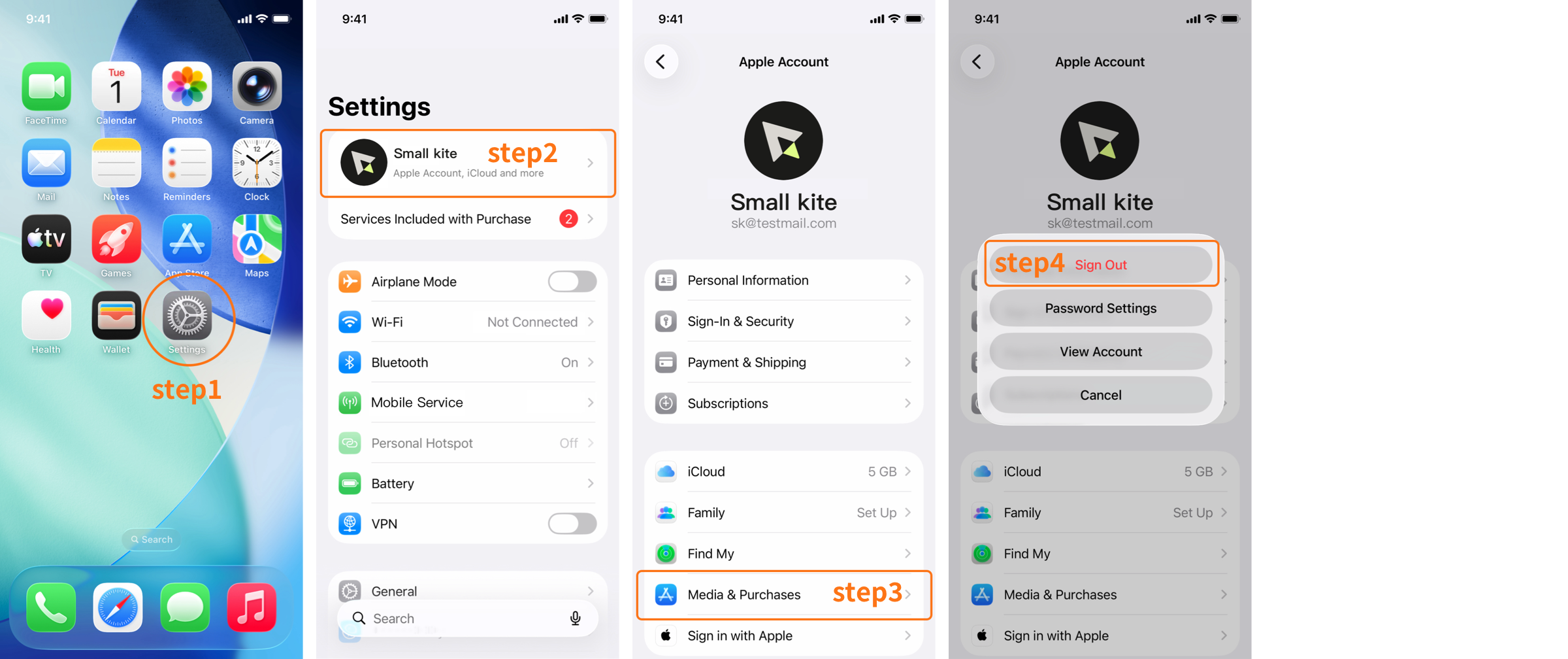
Step 2: Sign in with an overseas Apple ID
Recommended: 1. Hong Kong 2. Taiwan 3. United States
After signing in: open the App Store and search for Kite, or open the App Store download page directly to download and install.
Step 3: After installation
Direct registration
Visit the Apple ID registration page → choose a region → follow the prompts to finish registration.
Payment method
Registration is then complete.
Download link:Android APK
Tap the APK after the download completes.
If Android warns that unknown apps are blocked or installation is not allowed
Solution: Settings → Install unknown apps → allow browser or file manager → install the app
HarmonyOS 4.x
If Pure Mode or enhanced protection appears
Solution: Settings → search Pure Mode → disable the relevant restrictions and reinstall
HarmonyOS NEXT
HarmonyOS NEXT no longer natively supports Android APK. If direct installation fails, install the Android compatibility environment provided by the system first.
If security review or risk detection appears
Solution: wait until scanning completes and continue installation. If the install screen freezes, reopen the APK from File Manager.
Note: when security review appears, you can disconnect the network, such as enabling airplane mode, before installing.
Solution: Settings → Install unknown apps → allow the current browser to install apps → reinstall.
Download the Windows installer, then double-click it to install.
If Windows Defender appears: choose More info → Run anyway → finish installation.
Possible causes: Incomplete APK download, old version already installed, or insufficient storage Download the package again and reinstall
Your Apple ID region does not support the download Switch to a Hong Kong, Taiwan, or US account.
This is a system limitation. Use the system compatibility environment first, such as EasyAbroad.
Website:https://smallkite.com/support.html
If installation fails, provide your phone model, system version, and error screenshots to help troubleshooting.
Scan with the Kite mobile app to log in
Kite will open the app for authorization. Please make sure the app is installed on this device.
It may take some time to sync your membership after payment succeeds. Please check your membership status later. Contact customer service if you need help.
Are you sure you want to log out?